

Think you need to focus on long-form YouTube content? Think again! YouTube Shorts receive roughly 200 billion views per day. These videos appeal to many younger users, with most falling between the ages of 25 and 34, and they work for many brands, particularly those in the fashion, beauty, consumer goods, real estate, and travel industries.
Today, YouTube Shorts are the primary driver for long-term subscriptions and YouTube Shopping conversions, bringing people from the top of the funnel down to the bottom, culminating in more sales.
In this blog, Josh Rohr, Sr. Social Media Strategist, will explain how to make the most of those views with engaging YouTube Shorts.
TL;DR
This post will cover the following topics around YouTube Shorts:
- What Are YouTube Shorts?
- YouTube Shorts vs. TikTok vs. Instagram Reels
- Pros and Cons of YouTube Shorts
- How to Create a YouTube Short in 6 Easy Steps
- Special YouTube Shorts Features To Try
- How to Upload YouTube Shorts
- YouTube Shorts vs. Other Competitor Platforms
- YouTube Shorts Monetization Options
- 6 Important KPIs to Track
- Examples of Brands Using YouTube Shorts
- YouTube Shorts FAQs
What Are YouTube Shorts?
YouTube Shorts are short-form videos ranging from just a few seconds to 60 seconds. They are a fantastic way to get information out quickly, entertain your audience, and help amass a large following.
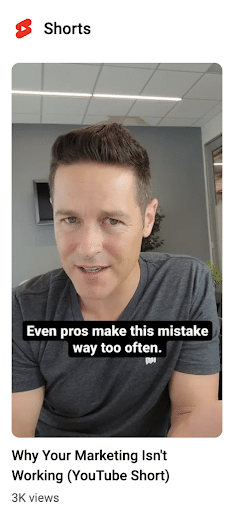
YouTube Shorts are just that – short. While all YouTube Shorts can gain traction, videos between 30 and 40 seconds are typically the most popular.
Can a Short be 25 seconds and do well? Absolutely! While the sweet spot is between 30 and 40 seconds, any length Short is better than no Short at all.
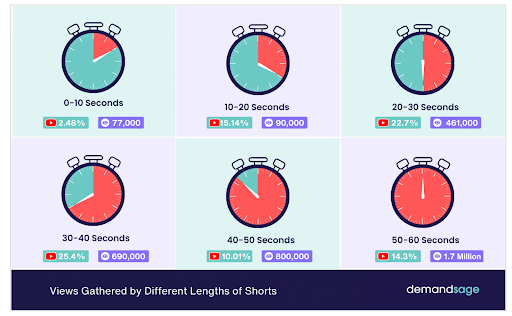
A YouTube Shorts video can also be longer, with the platform now testing three-minute Shorts for some creators, much like TikTok.
Developed as YouTube’s response to the rising popularity of short-form video, these bite-sized videos are created in a distinctive 9:16 vertical aspect ratio, making them easily distinguishable from traditional horizontal YouTube videos.
Shorts appear across multiple touchpoints within the YouTube ecosystem. The most popular place, though, is the dedicated Shorts feed. Serving as the primary discovery hub, it works similarly to TikTok’s FYP or Instagram’s Discover feed, encouraging viewers to scroll endlessly through content.
These popular videos are also seamlessly integrated into YouTube channel pages, search results, and the YouTube homepage. Since they pop up in multiple places and are captivating to watch, YouTube Shorts are a great way to maximize your visibility and reach.
What makes them so particularly powerful is their role in building channel awareness and engagement. When viewers discover your Short, they’re just one tap away from your main content channel. This interconnectedness helps creators and brands leverage Shorts as a discovery tool, working hard to convert casual viewers into long-term subscribers.
So, are YouTube Shorts worth it? Let’s find out by exploring these videos and what they’re all about.
YouTube Shorts Get Billions of Views – How to Make Your Mark
Understanding how valuable short videos on YouTube can be is one thing. Using them to get a ton of views is another.
A solid content strategy will help you tap into views and make your mark, even with more and more content being pushed out by other creators and brands daily. Keeping your videos short, making content that appeals to your audience, and working to add value to their lives are great cornerstones to build your strategy around.
Just like any social media platform, you’ll need to post consistently before you start to see a large ROI. However, because YouTube shorts are easy to make and don’t require any fancy equipment, you have a good chance of hitting your goals quickly.
My Expert Insight
To leverage the power of YouTube audiences, you need to create concise, captivating content. YouTube’s algorithm prioritizes Shorts, so include these in your marketing strategy to enhance your visibility.
I’ve seen how video marketing content can effectively convert audiences, with one of our telecommunications clients benefiting from a “How It Works” video that led to a 7.42% increase in form submissions and a 14.81% boost in phone clicks. Explainer videos like these are among the many types of content you can implement with YouTube Shorts.
YouTube Shorts are especially important in an age when people consume more short-form video content, as these videos tend to see 2.5 times more engagement than longer videos. If you want to capture and hold your audience’s attention, YouTube Shorts videos offer a great way to do so when long-form videos aren’t enough.
I recommend opening your video with a compelling hook to grab the viewer’s attention in the first few seconds. When creating content, tap into current trends and popular music and be sure to engage with your audience. And don’t forget to post regularly to maintain visibility and learn what your audience likes best.
YouTube Shorts vs. TikTok vs. Instagram Reels
Let’s consider the differences between YouTube Shorts, Instagram Reels, and TikTok videos to help you determine which platform to use for your campaigns.
YouTube Shorts
YouTube Shorts video connects with the rest of YouTube’s content as an integral part of this streaming platform. Often, when people search for videos on any topic, Shorts will appear alongside traditional long-form video content.
One of the benefits of using this content for creators is the fact that users can’t skip ahead in YouTube Shorts, keeping them consistently engaged with the content as it plays through.
The primary audience for YouTube Shorts is individuals between the ages of 25 and 34, making it ideal for reaching Generation Z and Millennials. The type of content that does well on Shorts also tends to be shorter versions of longer videos, acting as previews to get users interested in the full videos.
YouTube Shorts video content is particularly ideal for informational, how-to, and product research videos, giving people bite-sized pieces of information to help them learn more about your offerings while building brand trust.
Instagram Reels
Like YouTube Shorts, Instagram Reels are short-form videos posted on Instagram. One of the biggest differences between the two is that Reels can run for up to 20 minutes. However, videos over 3 minutes won’t be recommended to new audiences, so it’s best to stay under that time limit if your goal is to attract new consumers.
Instagram Reels can appear in all types of Instagram content, with the ability to show up in people’s feeds, an Explore tab specifically for these videos, and Instagram Stories. They are shown on both Instagram and Facebook, which helps increase reach and engagement.
If you want to use Instagram for marketing, Reels are a great way to connect with millions of users. It is particularly good for user-generated content along with repurposed content from other platforms. Many brands use these types of videos to connect with their audience through the Instagram ecosystem.
Also, consider the user intent behind Instagram, as people on this platform tend to seek out lifestyle and social content through Reels and longer videos.
TikTok
TikTok is another big platform that exclusively hosts short-form videos. These video lengths can range from 15 seconds to 10 minutes and cover many types of content.
Creators on the platform can easily use TikTok’s various tools and libraries to produce videos in no time.
The majority of TikTok’s audience is younger than either YouTube’s or Instagram’s, with the majority of its 1.58 billion monthly users being between the ages of 18 and 35.
When choosing a platform, prioritize your audience. While YouTube Shorts and Instagram Reels are ideal for reaching Millennials and many Gen Zers, TikTok is a good platform if your target audience is primarily Gen Z.
You can get attention with a variety of content, including lifestyle, food and drink, tutorials, and user-generated content that showcases users interacting with your products or services.
TikTok is especially good for entertainment and trending topics, which can help keep your brand relevant among target audiences.
Pros and Cons of YouTube Shorts
Like any digital platform, there are pros and cons to using YouTube Shorts.
Pro: Exposure Potential
The biggest pro of YouTube Shorts is the platform’s reach. Over 3 billion people visit YouTube every month. That is a lot of potential eyes on your content.
The content is also placed in multiple places throughout YouTube: in the Shorts tab within the YouTube app, and on your channel’s homepage. With other platforms, you are limited to exposure within the app and sometimes only on your own page. With Shorts, you’ll capture both the mobile and desktop audiences.
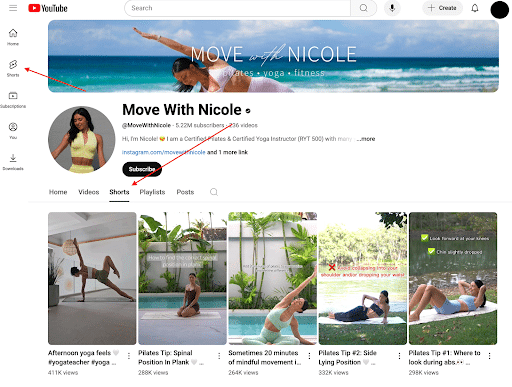
Before starting your YouTube Shorts strategy, be sure to check out YouTube’s advice for first-time creators.
Pro: Traffic to Your YouTube Channel
YouTube Shorts also serve as a lead magnet to your larger, more monetized videos. When a viewer watches your short video, they can automatically flow to your channel. They don’t have to click out of an app like they would if they were watching a TikTok or Instagram Reel.
This has proven very successful, as creators gain an average of 16.9 subscribers per 10,000 Shorts views.
Pro: High Engagement Rates
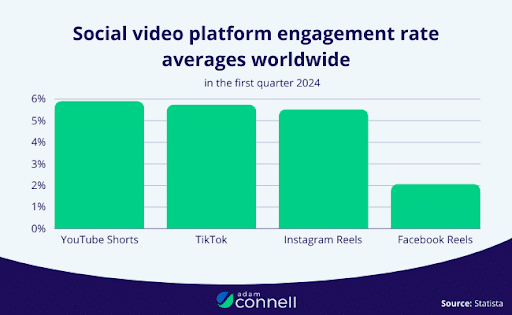
YouTube users are highly engaged, and Shorts are no exception! The average engagement rate of Shorts is 5.91% – higher than TikTok and Instagram Reels.
Here are some tips for building a community that will increase your chances of driving engagement with your videos.
Pro: Less Time Consuming
Creating short videos on YouTube is a lot less time-consuming and expensive than making full-length YouTube video content. Some YouTubers and brands spend a lot of money on influencers, backdrops, props, and video production. All of that expense adds up. Even low-rent full-length videos that may be cheaper financially take time and energy.
With YouTube Shorts, time, energy, and money aren’t an issue. All you need is an idea, your phone, and video marketing strategies. Any editing that needs to be done is done directly on the app.
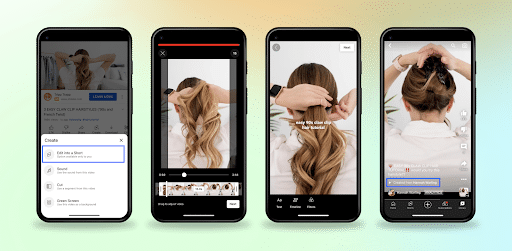
If you enjoy creating long-form videos, YouTube has tools to make cutting them down into Shorts easy. These free tools can be accessed directly in the creator section of the YouTube mobile app.
Pro: Multiple Monetization Opportunities
When YouTube Shorts were first introduced, creators were paid through something called the YouTube Shorts Fund. Over time, this complicated 2-year program evolved into the Shareable Ad Revenue Fund.
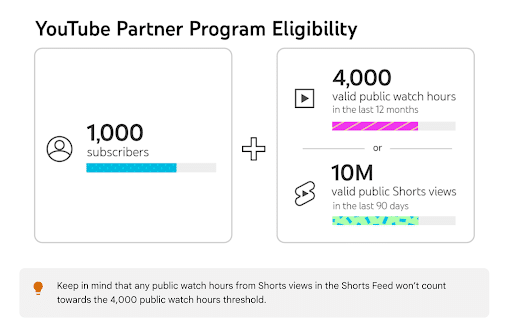
Acceptance into the YouTube Partner Program requires approval. The minimal requirements include 1,000 subscribers and either 4,000 valid public watch hours in the last year or 10M+ valid public Shorts views in the last 90 days.
Once you’re approved for the program, there are multiple ways to monetize your YouTube Shorts, including:
- Super Chat and Super Stickers
- YouTube Shopping
- Channel Memberships
- YouTube BrandConnect
- Super Thanks
- YouTube Premium revenue
You can subscribe to the YouTube Creators channel to stay up-to-date on all of the latest official news, tips, and education on how to monetize your channel.
Pro: Search Longevity
Another benefit of YouTube Shorts is the ability to appear in search results on both Google and YouTube long after your upload.
While TikTok videos disappear from search within 48 hours, Shorts continue to rank for months, potentially bringing in consistent traffic and viewership to get real, long-term results after posting.
This is why knowing how to optimize YouTube Shorts for SEO is so important, as it can supplement other optimization efforts to connect with target audiences in search engine results pages (SERPs).
Con: Fewer Optimization Options
As far as the cons of using YouTube Shorts, the biggest is probably the customization options. As time goes on, though, YouTube is adding more tools to improve your video effects, like the Effect Creation tool.
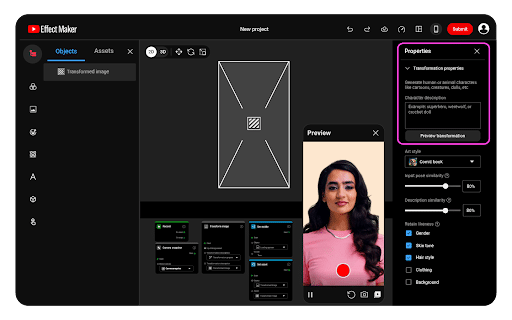
There are a few downsides to this tool, though. For example, it can only be accessed on a desktop computer, you have to be located in one of the available regions, and certain advanced features are limited to advanced Creators.
Con: YouTube Server
Another big con to using Shorts is that they are uploaded through the YouTube server. If you have a poor connection, the server is down, or the app is undergoing maintenance, you lose access to your channel.
How to Create a YouTube Short in 6 Easy Steps
Want to learn how to make a YouTube Short that connects with your audience and generates engagement?
Start by researching which types of content appeal to your audience and are fun or easy for you to create.
You’ll also want to keep in mind aspects such as:
- Lighting: Make sure your lighting is complementary. Take advantage of natural lighting by recording in a well-lit room or outside. If natural lighting is out of reach, set up a ring light.
- Angle: No one wants to watch a video that is shot at a weird angle. Instead, use a tripod or other mechanism to prop your phone up at a good angle. Make sure your phone stays steady!
- Orientation: YouTube Shorts were made for vertical videos so avoid creating content in a horizontal orientation.
Now that you know the basic things to worry about, follow the steps below to make the most of your next YouTube Shorts content creation session.
Step 1: Choose a Topic
The very first thing you’ll want to do when creating a YouTube Short is to select a topic for your video. Choose something that is interesting and fun but also related to your brand.
Some ideas include:
- Educational videos, such as quick and helpful tips in your industry
- Brief how-to videos
- Behind-the-scenes footage of you and your teams at work (or at play)
- Brand story videos
- Before-and-after videos
- Industry news and updates
- Long-form content converted into short-form videos
If you need some help coming up with a specific topic, brainstorm ideas with your team or check out what your competitors are doing. You can also ask your own audience what kind of video content they’d like to see from you.
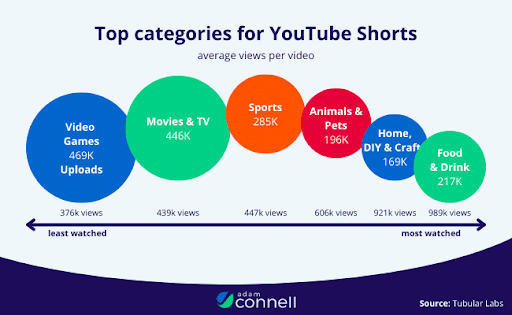
In addition to knowing what your audience wants, consider what tends to perform well on YouTube. Some of the top categories for YouTube Shorts include:
- Food & Drink
- Home, DIY, & Craft
- Animals & Pets
- Sports
Choose a topic you can talk about in 60 seconds or less. Ask yourself: What is the key message you want people to take away, and how can you convey it in less than a minute? Using a concise script and compelling visuals can help you connect with audiences in minimal time with YouTube Shorts.
Step 2: Prepare Your Shoot
Once you’ve selected your topic, it’s time to prepare for your shoot. YouTube Shorts don’t need as much preparation as you would with a more formal video, but you’ll still want to ensure everything is ready to go to create a strong and appealing video.
Make sure the lighting is right, have all of your points figured out when giving tips or relaying news, and record a few takes and ample footage overall to give you some options in post-production.
Step 3: Record Your Video
Now it’s time to record your video! You can use either your mobile device, a tablet, or another camera.
Just remember that YouTube Shorts are in vertical format, so it’s best to use a mobile device with a vertical camera option to record.
Step 4: Edit Your YouTube Shorts Video
Once you’ve recorded your video, you can begin the editing process. There are plenty of editing apps and software that you can use, or you can take advantage of the convenient tools within the YouTube app to put the final touches on your short-form video.
Before you finish editing, consider the kind of call-to-action you want to include to drive conversions. What steps should the viewer take next? This could entail liking and subscribing to your channel or visiting your website via a specific link. Encouraging engagement could also drive more comments, likes, and shares to connect with audiences.
Step 5: Optimize Your Video With SEO Elements
To give your video a shot at dominating search results on YouTube and Google, you need to know how to optimize YouTube Shorts for SEO with several key elements. These elements will include:
- Related keywords people will likely enter, which you should include in titles, tags, and descriptions in Shorts, with keywords appearing in the first three lines of descriptions and within your on-screen text, enabling algorithms to effectively “read” them.
- Closed captions that make your videos more accessible for wider audiences
- Questions that encourage viewers to engage with your videos through comments, likes, and shares that further increase visibility
- Playlists that can help your videos show up in more locations when people search
Step 6: Post Your Video at the Right Time
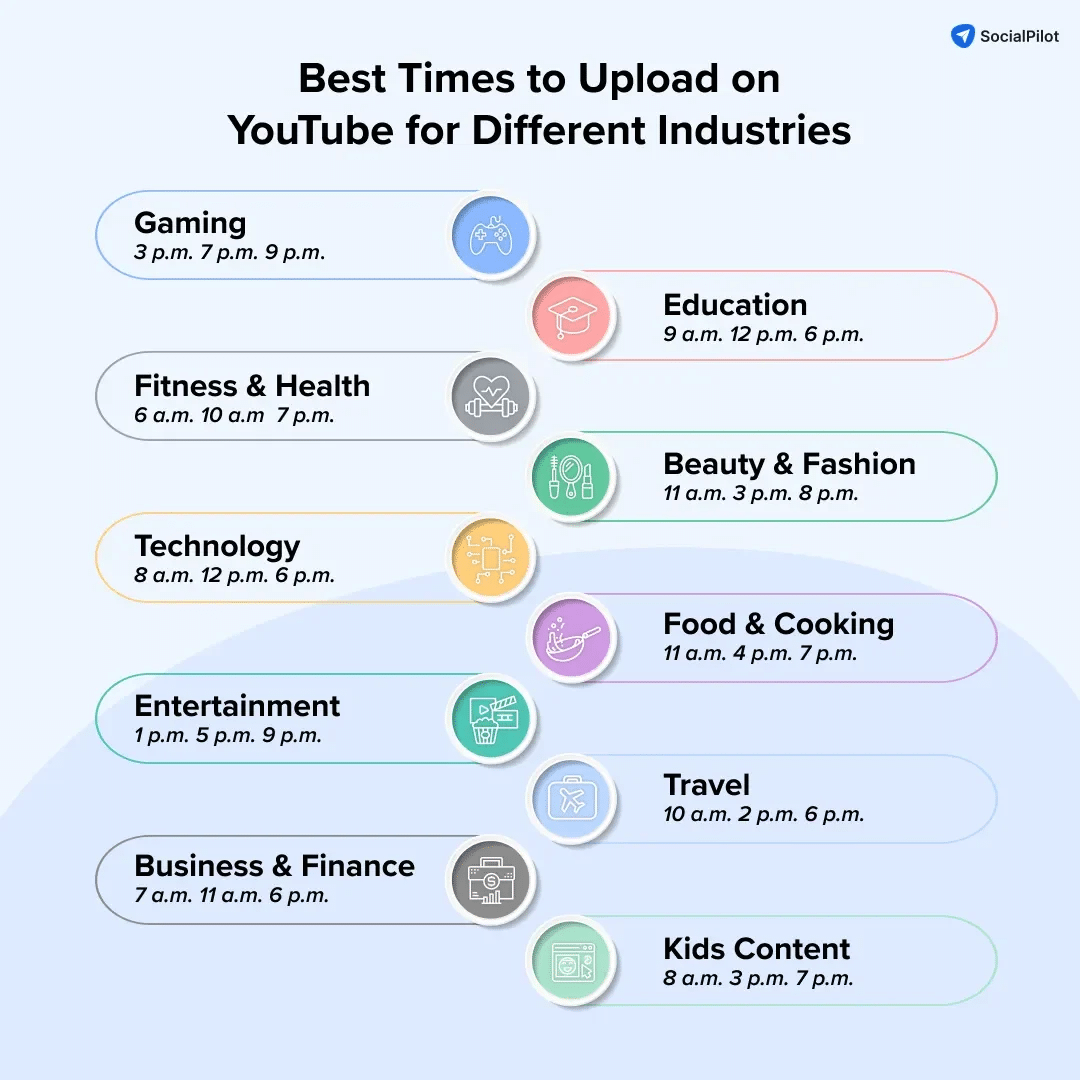
With your video optimized and ready to go, it’s time to post. However, you should post at the right time to ensure your video connects immediately with target audiences.
According to a SocialPilot study, generally, the best time to post YouTube Shorts is from 8 to 11 AM EST on the weekends or 3 to 5 PM EST on weekdays. However, this varies depending on your industry and your audience.
Now that you know how to make YouTube Shorts, let’s talk about some features you can try.
Special YouTube Shorts Features to Try
As YouTube Shorts evolves, so will the special tools and features. Let’s take a look at some of the tools YouTube has launched to help brands get more creative.
YouTube Shopping Tags
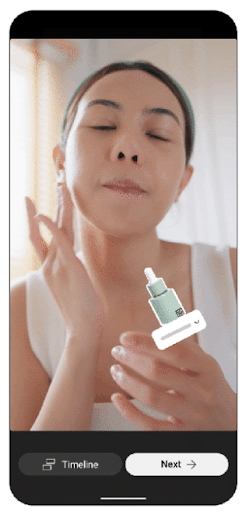
One of the most important features to take advantage of is YouTube Shopping tags. This element allows you to tag featured or relevant products directly in the Short for instant checkout, making it integral to conversion rate optimization efforts.
Simply choose the product you want to link your video to and include an image tag in an ideal placement on the screen, and people can tap on it to buy the product with minimal friction.
Effects & Stickers
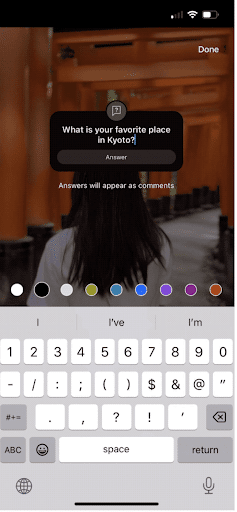
The Effects & Stickers feature makes YouTube Shorts more interactive. Brands can insert questions and other interactive options directly into their video. Viewers can respond in the provided text box and creators can then reply to comments with another YouTube Short.
Here is a YouTube Shorts video using text and arrows to clarify the footage:
Live
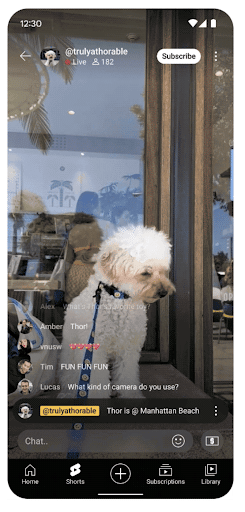
YouTube Shorts also now allows creators to go live right in the Shorts feed. Viewers can leave comments that will show up in real-time on the video, allowing brands and creators to interact as they’re filming.
This is just another way of connecting with your audience. Since engagement occurs in real time, it helps strengthen the connection between the consumer and the content creator or brand.
It also makes engagement easier than ever, since there is no video editing involved. It’s just you, your camera, and your audience.
The more you go live, the better you’ll understand your audience and what they want. Going Live will give you real-time insights into how viewers are responding to your content and what you can offer to engage them even more.
Live videos also offer multiple monetization options, including Super Chat & Super Stickers, Channel Memberships, and Advertising Revenue.
Remix
The Remix button within the YouTube Shorts dashboard lets you mix and match sounds, including ones you see on other creators’ videos. If you feel especially inspired after watching a certain view, the Remix feature will help you capture that feeling and produce content of your own.
Remixes are also a great way to expand your reach, because the source videos are credited in the remixed video. Users can also search for YouTube Shorts that use a particular remixed sound, putting your video on a discovery page of similar content.
The Shorts Playlist
See a YouTube Short you really liked? Now you can save it to your playlist! This will help creators keep track of sounds or trends they want to use in their own content while also helping other viewers curate playlists of related content, exposing your content to people who may have not seen it before.
If you create playlists based on certain topics, it will also make it easier for new viewers to binge content that they find interesting.
AI Tools
YouTube recently unveiled a range of new AI tools to further elevate creativity on the platform.
One of the most exciting features is Veo 3 Fast, a partnership with Google DeepMind that lets creators generate AI Shorts in seconds.
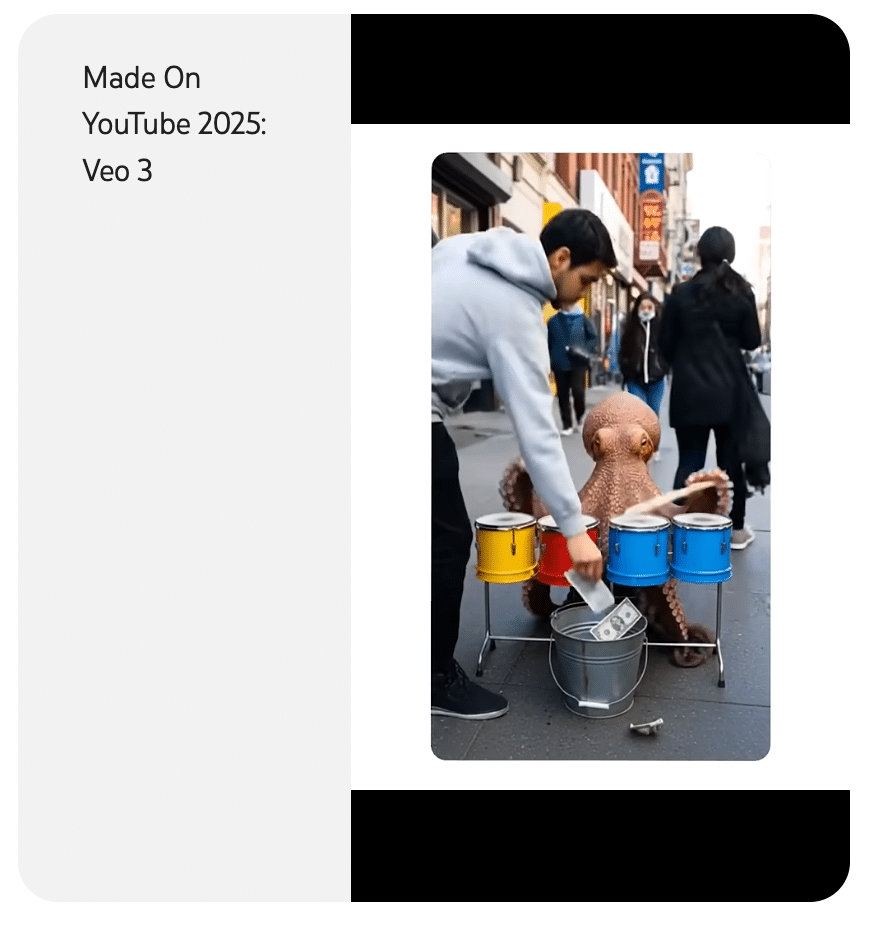
Not only will Veo 3 generate content for you, but you can also use it to:
- Add motion to static photos
- Stylize your videos
- Add objects to your video
You can use these tools to make your videos more engaging for your viewers or to transform static photos into live-action Shorts.
Also, you can use AI to “auto-dub” your YouTube Shorts into up to 10 languages, enabling you to instantly reach global audiences without the need for closed captions.
Every video generated by YouTube’s AI tools will be watermarked to let viewers know they are watching AI-generated content.
As YouTube Shorts continues to develop, don’t be surprised if you see more features and options to help improve your experience! New YouTube Shorts updates could bring new and exciting features that further optimize your marketing strategy.
How to Upload YouTube Shorts
With a better idea of how to make a YouTube Short, let’s look at the different ways to upload your videos to YouTube before posting.
Here are some steps on how to upload YT Shorts:
From Your Mobile Phone
YouTube Shorts can be created and uploaded in five simple steps.
To get started, log in to your YouTube account. Touch the Create button, then Create a Short. You can also upload an existing video you’ve created or go live from this menu.
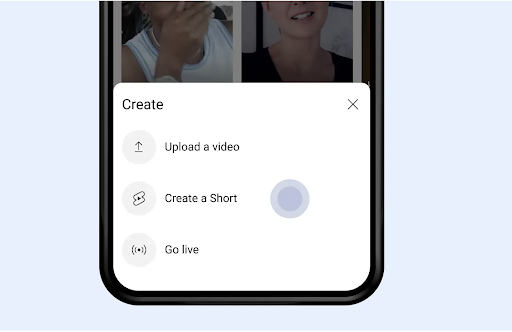
From here, you’ll choose your music and record or upload your Short. To record your clip, press and hold the record button. You can also tap it to start and tap it again to stop. This menu also lets you set the recording speed and timer, and edit clips on this screen.
After you’ve recorded your short, add filters and captions to your video. Adding captions is always a good idea so that people with hearing impairments can still enjoy your content.
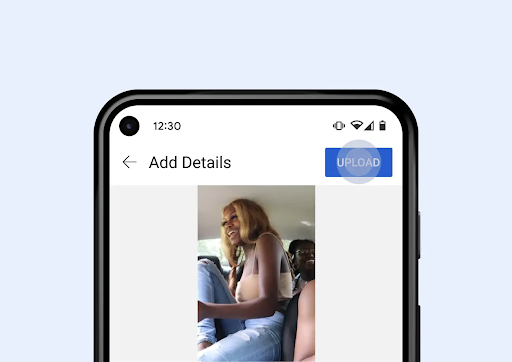
Once you’ve edited your video, added captions, and applied filters, share your YouTube Short! Click Upload in the upper right-hand corner.
Don’t forget to optimize discoverability by adding keyword-rich, descriptive captions and choosing an attractive thumbnail that stops your audience from scrolling.
From Your Desktop
If you’re uploading your YouTube Short from your desktop, you’ll need to prerecord your YouTube Short on your mobile phone.
Make sure your recording is still under 60 seconds.
Pro-Tip: record vertically to create a 9:16 aspect ratio.
Now you’ll upload your YouTube Short the same way you would upload a regular YouTube video.
In your YouTube Studio account, click Create, then Upload a Video. Select your file and start filling in the required fields.
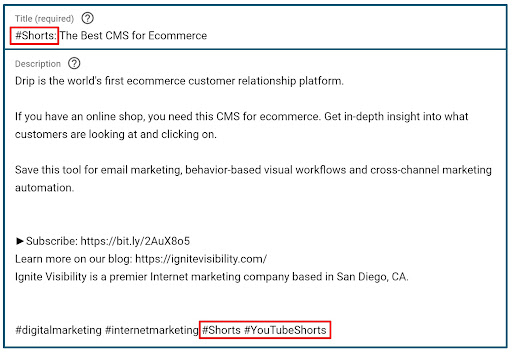
Include the word “Shorts” somewhere in your title and your description to indicate to YouTube that your video is a Short, rather than a full-length video.
Don’t forget to:
- Add captions to improve accessibility
- Generate a detailed and keyword-rich description
- Choose an attractive and engaging thumbnail
- Add it to a playlist with other similar videos
YouTube Shorts vs. Other Competitor Platforms with Short-Form Video
There are a few differences between YouTube Shorts and other short-form video platforms like TikTok or Instagram Reels.
Technical Requirements
All platforms require videos to be shot in a 9:16 vertical format.
They also position their videos in a somewhat addictive format, whether on TikTok’s FYP, or Instagram or YouTube’s Discovery pages. While the algorithms differ, the format remains the same: encourage viewers to keep scrolling!
Audience Demographics
YouTube Shorts tend to attract people looking for educational content and long-term value, whereas TikTok dominates in viral trends and engagement. On the other hand, Instagram Reels are great for established influencer networks and business integrations.
Consumers of all ages view YouTube Shorts, while TikTok tends to be Gen Z and Millennials, and Instagram Reels are most attractive to Millennials. If you cross-post your Reels onto Facebook, you’ll start to creep up into Gen X and Baby Boomer territory.
Time Allowance
While YouTube Shorts prefers videos up to 60 seconds, it is possible to create a 10-minute-long Short. TikTok also allows 10-minute videos, but videos 2 minutes or less usually perform best. The maximum length for an Instagram Reel is 3 minutes, though you can upload 15-minute videos if you are okay with them not being shown to new audiences.
Content Preferences
YouTube Short viewers are coming to the platform for educational content, how-tos, product reviews, and hauls.
TikTok users tend to be interested in trends, challenges, and entertainment. They want information when it’s hot!
Instagram Reels focus more on lifestyle content, fashion, beauty, and behind-the-scenes. These users don’t necessarily care about the latest trends.
Monetization Options
The ways you can monetize your content also vary across platforms. YouTube Shorts monetization consists of the YouTube Partner Program, ad revenue sharing, and Super Thanks, a unique payment and gift process. More on that momentarily.
TikTok offers the Creator Fund and TikTok Shop, as well as opportunities for brand deals and partnerships. A lot of TikTok users will also go Live for gifts and other cash opportunities.
Instagram Reels pay the least, only offering opportunities for outside brand collaborations or partnerships.
YouTube Shorts Monetization Options
If you want to make money with your Shorts, there are several options available to help you do so.
The YouTube Partner Program (YPP)
One way you can make money with Shorts is to become part of the YouTube Partner Program, which offers several ways to monetize your videos:
- YouTube Shorts ads
- Premium subscriptions
- YouTube Shopping
- Fan funding
To qualify for the YPP, you must meet several eligibility requirements, including:
- 1,000 subscribers and either a minimum of 4,000 legitimate public watch hours in the last 12 months or 10 million legitimate public Shorts views within the past 90 days
- Your channel is based in one of the 137 supported countries and regions, including the U.S., Canada, and the U.K.
- No active Community Guidelines strikes
- An AdSense account to connect to your channel
- Advanced features access
Sponsorships
You can also make money through sponsorships with various creators and brands. Having these parties sponsor your videos could help you make more money, or you can sponsor others to advertise your products or services.
Conversions Through Increased Visibility
By taking steps to reach more viewers and maximize your visibility on the platform, you can more easily reach audiences who are more likely to convert into customers. Increased visibility also means more people will see your video ads if you’re part of the YPP, meaning even more revenue via this channel.
6 Important KPIs for YouTube Shorts
Since YouTube Shorts are still in the beta phase, things are constantly changing and the key performance indicators are still evolving.
However, you can monitor your performance by looking at the same KPIs you would use for any video posted on the YouTube platform. These KPIs include:
1. Total Engagement
This metric accounts for all forms of engagement your videos attract. It specifically measures the amount of people who like, comment, and otherwise engage with your videos.
You can calculate the average total engagement rate by taking the total engagement rate per post and dividing it by the number of total posts.
You can increase total engagement by creating more enticing content, interacting with audiences in comments or responding to content requests, and optimizing your video titles and thumbnails.
2. Viewed vs. Swiped Away Ratio
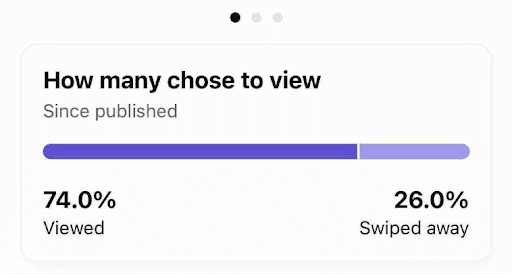
Another critical metric to measure for your YouTube Shorts video is your viewed/swiped away ratio.
This KPI tracks the number of people who view your videos vs. swiping away, and when they do so. Consider this the “God Metric,” as it can indicate whether your videos are successful or failing to connect with viewers.
Generally, if more than 30% of viewers swipe away within the first three seconds, videos die on the platform. You want to ensure people are watching your videos to completion as much as possible, especially considering how digestible Shorts are compared to long-form content.
3. Number of Subscribers
You can also see this metric in your dashboard, including the number of people who’ve subscribed within a certain period. This metric is helpful in determining how effective your videos are at making people loyal to your channel and brand.
You can grow your subscriber base by creating compelling content, but you can also encourage people to like and subscribe in your videos and descriptions. Also, posting consistently will make people more likely to subscribe as they look forward to seeing regular posts from you.
4. Traffic Sources
This KPI indicates where people are coming from to view your YouTube Shorts. You can see which sources are drawing the most traffic to your videos and determine which sources may need a bit of a lift to increase traffic. The YouTube Analytics dashboard will let you know the sources behind your video traffic.
You can boost more traffic to your videos in a number of ways. For instance, you can create high-quality content that people are eager to share on social media and other platforms.
You can also boost traffic from various sources by posting your Shorts on your website, blog, social media profiles, and other locations where your audiences are likely to see them.
5. Watch Time
The length of time people watch your videos also indicates how well your videos are performing. Considering Shorts tend to be much shorter than traditional videos, many people should be watching your videos to the end.
If you find that people aren’t watching through your videos, you may want to change the openings to more effectively engage and hold viewers’ attention.
You may also be able to extend watch times by determining the best time to post YouTube Shorts, when most of your audience is at its most active.
6. Click-Through Rate
One final metric to consider is the click-through rate (CTR). A high CTR indicates that people are converting with your videos and not simply moving on.
If you discover your CTR isn’t meeting your conversion goals, you could engage in conversion rate optimization by updating your CTA or video content or boosting visibility.
Monitoring these KPIs with analytics solutions will give you a good idea of whether your work with YouTube Shorts is worth it or not.
Examples of Brands Using YouTube Shorts
Here are some great examples of brands that have already started using YouTube Shorts.
Ignite Visibility
Here at Ignite, we’ve tapped into the YouTube Shorts phenomenon with a high rate of success.
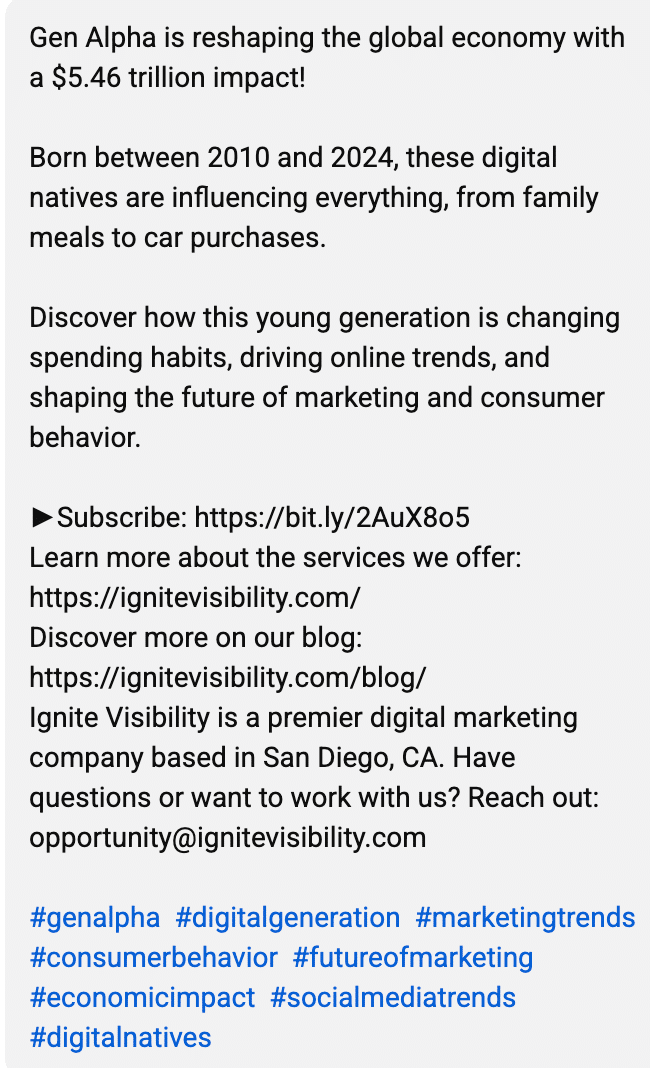
This short, which discussed a huge shift in social media trends, received over 10,000 views. It was a great way to get time-sensitive information out to our audience, while also grabbing the attention of new viewers.
Bubble
Healthcare-related brands, such as Bubble Skincare, have also seen success with YouTube Shorts.
In this YouTube Short, the skincare brand partnered with a popular influencer to do an unboxing of their latest products. The short was a success, obtaining over 113,000 views.
WrenchWay
YouTube Shorts also work for brands in the automotive industry, such as WrenchWay.
In this short, the automotive brand showcased what their service advisors do in a day. Even better, they repurposed a TikTok video and posted it on YouTube Shorts. They only had to create one video to be used on multiple platforms and seen by multiple audiences.
Sprouht
Financial services creator, Sprouht, has also found success through YouTube Shorts.
Sprouht gives advice on how to create a better life using the tools, insights, and experiences around us. Through his YouTube Shorts, he captures the attention of audiences with catchy titles and consistent posting.
YouTube Shorts FAQs
1. What are YouTube Shorts?
YouTube Shorts are 9:16 vertical videos designed for mobile viewing. They appear on YouTube’s dedicated Shorts feed, search results, channel pages, and homepage. Shorts compete with TikTok and Instagram Reels, offering creators and brands a way to make quick, engaging content that can boost channel and brand visibility and engagement.
2. How do I create a YouTube Short?
You can create Shorts using the YouTube mobile app by tapping the + icon and selecting “Create a Short.” You can also upload vertical videos from your device. The Shorts app includes basic editing tools, music options, text overlay, filters, and speed controls.
3. How long can a YouTube Short be?
YouTube Shorts can be up to 60 seconds in length. While creators can make videos as short as a few seconds, the maximum duration is capped at one minute. This length was strategically chosen to balance engagement potential with content delivery, though many successful Shorts run between 30-45 seconds.
4. What do the best-performing YouTube Shorts have in common?
Top-performing Shorts typically feature strong hooks in the first 3 seconds, clear value propositions, and engaging visuals. They often include trending music or sounds, text overlays for clarity, and a clear call-to-action. Successful Shorts maintain high viewer retention through fast-paced editing, personality-driven content, and focused messaging that delivers on the hook’s promise.
5. When is the best time to post a YouTube Short?
The optimal posting time for Shorts is typically between 6-8 PM local time on weekdays when mobile engagement peaks. However, posting 2-3 Shorts daily at different times can help determine your specific audience’s preferred viewing times. Weekend mornings (9-11 AM) also show strong engagement, particularly for entertainment and lifestyle content.
6. When was YouTube Shorts created?
YouTube Shorts were first introduced in India in September 2020. It was launched as a beta test in the United States in March 2021, before being rolled out globally on July 13, 2021.
7. Can I repurpose TikToks as YouTube Shorts?
Yes, you can repurpose TikTok videos for YouTube Shorts videos. However, to keep YouTube from shadowbanning your video and limiting its reach, you must remove the TikTok watermark from your video when converting it into a Short.
8. Does posting a Short hurt my long-form channel?
No. If anything, knowing how to upload YT Shorts with the right content can supplement and support your long-form content, with a dedicated Shorts section in your channel and the ability to reach users who might not otherwise find your long-form videos. You can also use Shorts as previews or teasers for your long-form content.
9. What is the “Viewed vs. Swiped Away” metric?
What is YouTube Shorts’ “Viewed vs. Swiped Away” KPI? This metric measures the number of views your videos get compared to the number of times people swipe away within a certain period. Keep in mind that your video could fail if 30% of viewers swipe away within the first three seconds.
10. Can I use AI to generate my entire Shorts strategy?
If you’re wondering how to upload YT Shorts or how to optimize YouTube Shorts for SEO, you can use various AI tools to help with the process, from outlining your videos to generating content with YouTube’s native platform. At the same time, you should ensure your videos incorporate a human touch to connect with audiences, and include a disclaimer when using AI in marketing.
11. How do I use “Related Links” in Shorts?
In your Shorts videos, you can include a Related Links section that takes people to other videos, including long-form content, other Shorts, or live streams, encouraging people to continue engaging with your channel and videos. You can manually select related videos to include when uploading your Shorts.
Ready to Give YouTube Shorts a Try?
To answer the original question: Are YouTube Shorts worth it? We’re going to say yes… for now.
They are engaging, entertaining, and educational. It’s a great way to build your brand awareness, increase your reach, and find new lifelong fans. I think that YouTube Shorts are definitely a trend worth exploring, especially if you already have a long-form video channel on the platform.
Reach out to our social media marketing experts to help you make some YouTube Shorts of your own.
With our experts behind your YouTube Shorts campaigns, you can:
- Create high-quality Shorts to connect with your audiences
- Maximize visibility with optimization
- Monetize your videos through the Partner Program and other opportunities
- Integrate your Shorts into a complete marketing strategy
- And more!
Want to learn more about our social media management services and discover what our experts can do for your marketing strategy.

